
Agent Hub Rules
Agent Hub Rules are a series of preset rigid constraints or logical conditions for VJSP, used to control AI behavior boundaries.
These can be code logic, configuration items, policy files, if-then conditions, etc. They set bottom lines or enforce logic, such as permission control, output filtering, security restrictions, etc.
✅ Please note: Rules need to be bound to an Agent before they can take effect.
Rules Page Overview
Log in to the Agent Hub page
Click the 「Rules」 tab to directly enter the rules list display page
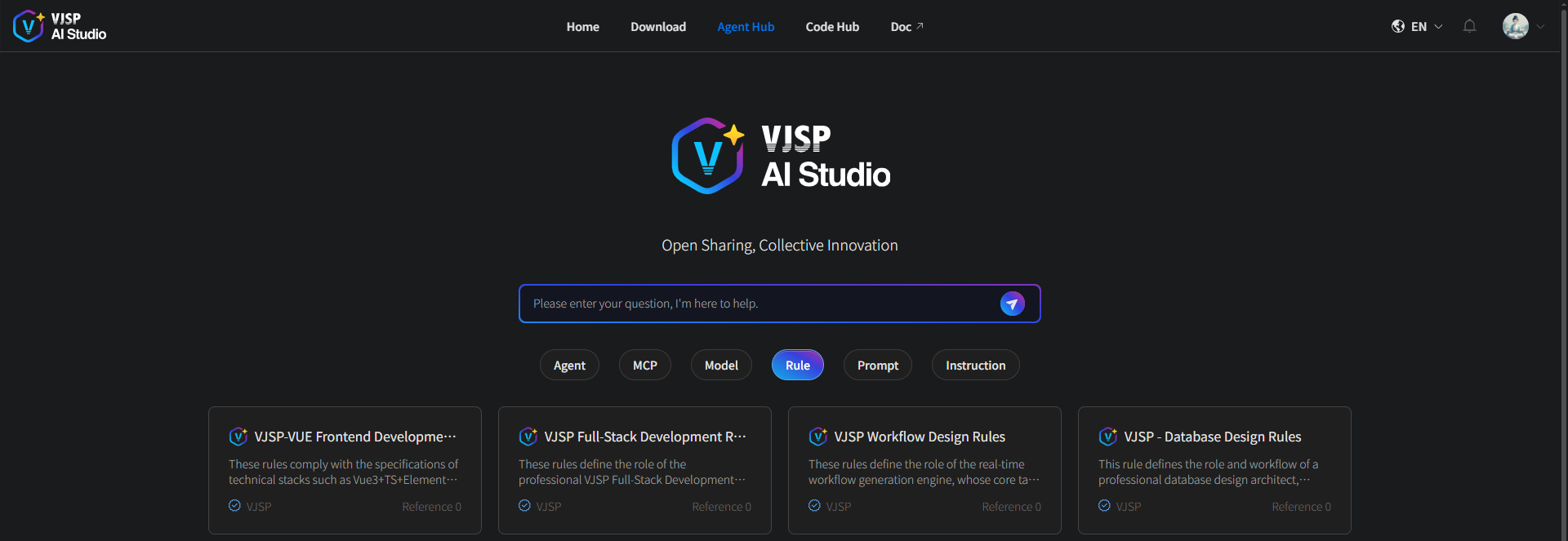
Using Official Rules
Browse existing rule lists and view rule cards on the Agent Hub page.
View details by clicking any card to enter the details page and learn about its description information.
Click "Use Now" and select the Agent you want to associate.
Prerequisite: You must be logged into the system. If not logged in, please complete login first.
You can only associate with Agents you created yourself.
Custom Rules
1. Create New Rule
Through custom rules, you can adapt to personal coding habits or project-specific requirements with simple and efficient steps:
Operation Steps:
Log in to the official platform,
Select "My Agents" in the left navigation bar of the console → Click the 【New Rule】 button:

- In the pop-up "Create Rule" page, fill in the key information as required:
Rule Name (recommended to name by "Scenario + Language", such as "E-commerce Project - Java Naming Rules")
Rule Body Details: Such as naming conventions (camelCase / snake_case), prohibited syntax (like eval, innerHTML), mandatory validations (like comment requirements)
Rule Description: Description information
- Click 【Confirm】, and the rule is successfully saved.
2. Edit Rule
Purpose: Modify existing rule content to better achieve personalized and customized interactions.
Operation Steps:
Click on your rule card to enter the details page
Click the "Edit" button
Modify content
Automatically updates after saving.
3. Rule Body Example
Example:
# Role
You are a professional database design architect. Your core responsibility is: to help design database table structures through requirements.

# Task: Design database according to the following requirements
  Generate PostgreSQL database tables by default, follow user requirements when specified.

 Database Table Design Standards:
 - **Table Quantity**: Can be decomposed into multiple tables for complex business, but avoid over-design, maintain moderate table count
 - **Table Names**: All uppercase, words connected with '_', child tables prefixed with parent table name
 - **Table Description**: Briefly describe table purpose, function, related tables, etc.
 - **Field Naming**: All uppercase, words connected with '_'
 - **Field Types**: Primary key uses VARCHAR(36), other fields are optional

### 📝 Output Table Creation Statements

Each table must strictly follow the structure output. After table structure design is complete, immediately stop and wait for user confirmation before performing other tasks📋 Core Dimensions for Rule Configuration
When creating custom rules, you can focus on configuring the following dimensions to cover most scenario requirements:
Format Standards: Indentation type/length, line breaks, code line length limits, comment formats
Naming Conventions: Variable/function/class/constant naming (camelCase, snake_case, PascalCase, etc.)
Syntax Control: Prohibit high-risk syntax (
eval,document.write), prohibit deprecated APIs, enforce secure practices (likeinnerHTML→textContent)Business Rules: Internationalization text extraction standards, SQL injection prevention standards, interface return format validation
🧩 Best Practices Guide
| Application Scenario | Recommended Rule Configuration Solution | Core Benefits |
|---|---|---|
| New Project Launch | Create "Project Initialization Rule Package" including: Basic format rules (indentation, naming) Multi-language common prohibited syntax Code comment standards | Unify style from project start, avoid later refactoring |
| Multi-language Mixed Project | Split independent rules by language: Java rules (class naming, exception handling) HTML/CSS rules (tag closure, style naming) SQL rules (field naming, query standards) | Rules precisely adapt to different language characteristics |
| Internationalization Required Project | Directly enable/extend "i18n Rules": Unified text key naming format (e.g., module_page_function)Force extract hard-coded text Multi-language file format validation | Avoid key confusion, reduce multi-language maintenance costs |
| Security Audit Scenarios | Configure "Security Rule Package": Prohibit high-risk syntax ( eval, innerHTML)Force XSS protection practices SQL parameterized query validation | Reduce security vulnerabilities, more efficient audits |
| Legacy Project Refactoring | 1. First create "Compatibility Transition Rules" (prompt only, not enforce) 2. Gradually iterate to "Strict Rules" 3. Combine with plugin one-click formatting | Smooth transition, reduce refactoring resistance |
Using Custom Rules
After a custom rule is successfully created, it can be associated with an Agent when creating or editing the Agent. Only after this binding is completed can the Agent call the custom rule to execute tasks.