
Codebase Indexing
Codebase Indexing enables semantic code search across your entire project via AI embeddings. Instead of searching for exact text matches, it understands the meaning of your query, helping VJSP locate relevant code even when you don't know specific function names or file locations.
Functionality
Once enabled, the indexing system:
Parses your code with Tree-sitter to identify semantic blocks (functions, classes, methods)
Generates embeddings for each code block using an AI model
Stores vectors in a Qdrant database for fast similarity search
Provides VJSP with the
codebase_searchtool for intelligent code discovery
This allows natural language queries (e.g., "user authentication logic" or "database connection handling") to find relevant code across your entire project.
Key Benefits
Semantic Search: Locate code by meaning, not just keywords
Enhanced AI Understanding: VJSP can better comprehend and utilize your codebase
Cross-project Discovery: Search all files, not just open ones
Pattern Recognition: Identify similar implementations and code patterns
Qdrant Vector Database Configuration
Qdrant is the core tool for embedding vector storage and retrieval, supporting two configuration methods as follows:
Method 1: Local Vector Database
Default Address:
http://localhost:6333Authentication: API key configuration is supported and optional for secure deployment
Method 2: Apply for a Dedicated Vector Database via VJSP Official Website
Dedicated Address: Obtain the exclusive URL through the VJSP Official Website Console - API Key
Authentication: A dedicated API key applied via the official website is required (mandatory field)
ⓘ API Key Application Instructions
The Qdrant exclusive URL and API key must be applied for through the VJSP Official Website Console. After successful application, copy the relevant information to the corresponding configuration items of Codebase Indexing. For detailed acquisition steps, refer to the corresponding help documentation.
Configuration
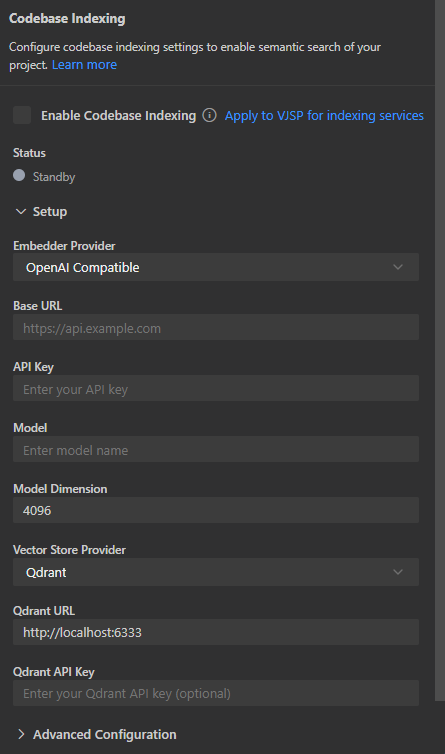
Open the Index Ready icon in the bottom right corner of the VJSP dialog
Toggle the switch to enable "Enable Codebase Indexing"
Configure your embedding provider
Set the Qdrant URL and optional API key
Configure Maximum Search Results (Default: 50, Range: 1-100)
Click Save to start the initial indexing
Enable/Disable Toggle
The Codebase Indexing feature includes a convenient toggle switch that allows you to:
Enable: Start indexing your codebase and activate the search tool
Disable: Stop indexing, pause file monitoring, and disable the search function
Retain Settings: Your configurations are saved when turned off
This toggle is useful for temporarily disabling indexing during intensive development work or when handling sensitive codebases.
Understanding Index Status
The interface displays real-time status with color indicators:
Standby (Gray): Not running, waiting for configuration
Indexing (Yellow): Currently processing files
Indexed (Green): Up-to-date and ready for search
Error (Red): Failed status requiring attention
File Processing Methods
Intelligent Code Parsing
Tree-sitter Integration: Identify semantic code blocks using AST parsing
Language Support: All languages supported by Tree-sitter
Markdown Support: Full support for markdown files and documentation
Fallback: Line-based chunking for unsupported file types
Chunk Size:
- Minimum: 100 characters
- Maximum: 1,000 characters
- Intelligent splitting for large functions
Automatic File Filtering
The indexer automatically excludes:
Binary files and images
Large files (>1MB)
Git repositories (
.gitfolder)Dependencies (
node_modules,vendor, etc.)Files matching
.gitignoreand.vjsppatterns
Incremental Updates
File Monitoring: Monitor changes in the workspace
Intelligent Updates: Only reprocess modified files
Hash-based Caching: Avoid reprocessing unchanged content
Branch Switching: Automatically handle Git branch changes
Current Limitations
File Size: Maximum 1MB per file
Single Workspace: One workspace at a time
Dependencies: Requires external services (embedding provider + Qdrant)
Language Coverage: Optimal parsing limited to Tree-sitter supported languages
Using the Search Function
After indexing, VJSP can use the codebase_search tool to find relevant code:
Example Queries:
"How is user authentication handled?"
"Database connection settings"
"Error handling patterns"
"API endpoint definitions"
The tool provides VJSP with:
Relevant code snippets (up to the configured maximum result limit)
File paths and line numbers
Similarity scores
Context information
Search Result Configuration
You can control the number of returned search results by adjusting the Maximum Search Results setting:
Default: 50 results
Range: 10-200 results
Performance: Lower values improve response speed
Comprehensiveness: Higher values provide more context but may slow down responses
Privacy & Security
Code Remains Local: Only small code snippets are sent for embedding generation
Embeddings Are Numeric: Not human-readable representations
Secure Storage: API keys are encrypted in VS Code and IDEA storage
Access Control: Respects existing file permissions