
Task planning
Core Idea: Never lose track of complex development tasks again. Task to-do lists create interactive, persistent checklists directly embedded in your chat interface.
Why It Matters: Complex workflows have many moving parts. Without structure, it’s easy to miss steps, duplicate work, or forget what comes next.
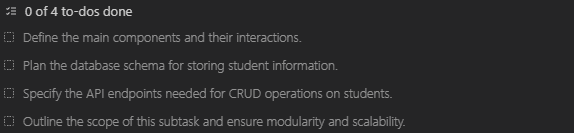
How To-Do Lists Are Triggered
Automatic Triggering:
- Complex tasks involving multiple steps
- Working in Architect mode
- Multi-phase workflows with dependencies
Manual Triggering:
- Ask VJSP to “use the update_todo_list tool”
- Say “create a to-do list”
Key Point: VJSP decides what goes into the list, but you can provide feedback in the approval dialog.
VJSP creates a structured checklist that automatically updates as work progresses. You always know exactly where you are and what to do next.
Where To-Do Lists Appear
1. Task Header Summary – Quick progress overview showing your next critical item

2. Interactive Tool Panel – Full to-do interface within the chat, where you can:
- View all items and their statuses
- Edit descriptions when VJSP requests approval
- Stage changes using the “Edit” button
3. Environment Details – A background “reminders” table that helps VJSP track current progress
Understanding Task Statuses
Pending → Empty checkbox (not started)

In Progress → Yellow dot (currently being worked on)

Completed → White checkmark (finished)

Frequently Asked Questions
“Can I create my own to-do list?”
Yes—just ask VJSP to use the update_todo_list tool. However, VJSP still controls the content and workflow.
“What about simple tasks?”
VJSP typically skips to-do lists for simple tasks. The overhead isn’t worth it.
“Why can’t I edit the list directly?”
By design. VJSP maintains ownership of task management to ensure consistent progress tracking. You provide input; VJSP executes.
💡Pro Tip
Auto-Approval
What it does: Automatically approves to-do list updates without confirmation prompts.
When to use: During long workflows where frequent interruptions slow you down.
How to enable: Check the auto-approval settings for to-do list updates.
Trade-off: Less control, but faster execution.