
Suggested Replies
When VJSP needs more information to complete a task, it uses the ask_followup_question tool. To make responses easier and faster, VJSP often provides suggested answers alongside its questions.
Overview
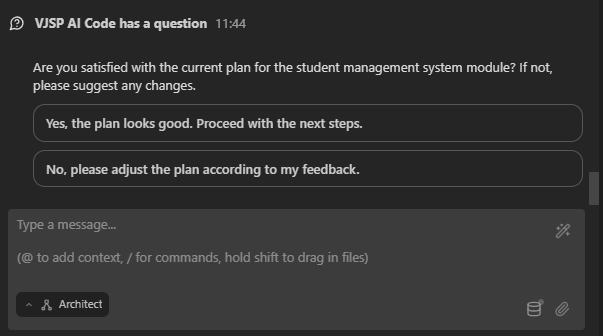
Suggested replies appear as clickable buttons directly beneath VJSP’s question in the chat interface. These preset options offer relevant answers to help you quickly provide the necessary input.
How It Works
- Question Appears: VJSP asks a follow-up question using the
ask_followup_questiontool. - Suggestions Displayed: If suggestions are available, they appear as buttons below the question.
- Interaction: You can respond using one of two methods.
Interacting with Suggestions
You have two ways to use suggested replies:
Select Directly:
- Action: Simply click the button containing the answer you want to provide.
- Result: The selected answer is immediately sent back to VJSP as your reply. This is the fastest way to respond when a suggestion perfectly matches your intent.
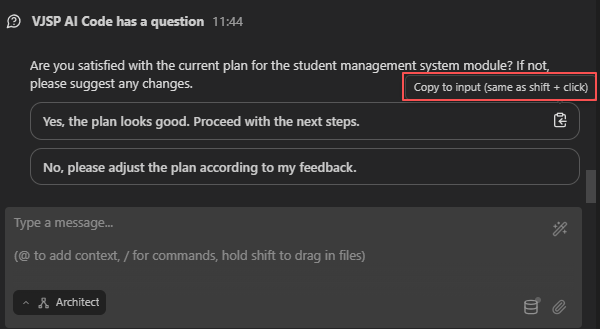
Edit Before Sending:
- Action: Hold down
Shiftand click the suggestion button. - Result: The suggested text is copied into the chat input box. You can then modify it as needed before pressing Enter to send a customized response. This is useful when the suggestion is close but requires minor adjustments.
- Action: Hold down
Benefits
- Speed: Reply instantly without typing full responses.
- Clarity: Suggestions often clarify the type of information VJSP is seeking.
- Flexibility: Edit suggestions to deliver precise, tailored answers when needed.
This feature streamlines interactions whenever VJSP requests clarification, enabling you to guide tasks effectively with minimal effort.