
Custom Workflows
Workflows automate repetitive tasks by defining step-by-step instructions for VJSP. Simply type /[workflow_name.md] in a conversation to invoke any workflow.
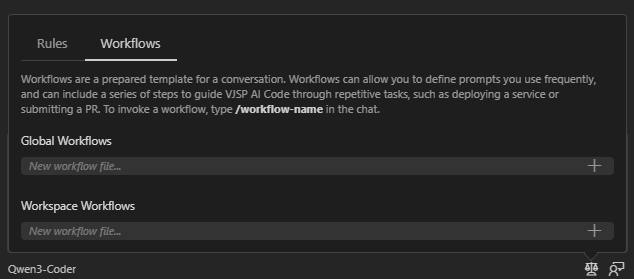
Creating a Workflow
Workflows are Markdown files stored in the .vjsp/workflows/ directory and fall into two categories:
Global workflows: located at
~/.vjsp/workflows/(available across all projects)Project-specific workflows: located at
[project]/.vjsp/workflows/(only applicable to the current project)
Basic Configuration Setup
- Create a Markdown file containing step-by-step execution instructions
- Save the file to one of the workflow directories above
- Trigger execution by typing
/filename.mdin the chat
Workflow Capabilities
Workflows can integrate the following features:
Built-in tools:
read_file()(read files),search_files()(search files),execute_command()(execute commands)Command-line tools:
gh(GitHub CLI),docker,npm, and custom scriptsMCP integrations: Slack collaboration tools, databases, and various APIs
Mode switching: switch to a specific task execution context using the
new_task()function
Common Workflow Templates
Version Release Management
1. Summarize merged Pull Requests (PRs) since the last release

2. Automatically generate a changelog based on commit messages

3. Update the project version number

4. Create a release branch and tag it

5. Deploy to the staging environmentProject Initialization Setup
1. Clone the project template repository

2. Install project dependencies (run `npm install` or `pip install -r requirements.txt`)

3. Configure environment variable files

4. Initialize the database and related services

5. Run initial test casesCode Review Preparation
1. Scan code for leftover `TODO` comments and debugging statements

2. Run static analysis and code formatting tools

3. Execute the full test suite

4. Generate a PR description document based on recent commitsExample: PR Submission Workflow
Below is a complete example of a PR submission workflow that automates the entire process—from code review to deployment notifications.
Create a new file named submit_pr.md in the .vjsp/workflows directory with the following content:
# PR Submission Workflow

You are to assist with the Pull Request submission process by following these steps:

1.  First, use the `search_files` tool to check for any `TODO` comments or `console.log` debugging statements that should not be committed

2.  Use the `execute_command` tool to run tests, such as `npm test` or other project-appropriate test commands

3.  If tests pass, stage and commit the code changes with a clear commit message

4.  Push the branch to the remote repository and create a Pull Request using the `gh pr create` command

5.  Use the `ask_followup_question` function to request the PR title and description from the user

(If the following parameters are not provided by the user, proactively ask for them)

- Name of the branch to be submitted

- Designated code reviewersTyping /submit_pr.md in the conversation triggers this workflow, and VJSP will automatically:
- Scan for common issues before submission
- Run the test suite in advance to catch potential bugs early
- Handle Git operations and PR creation automatically
- Send automatic notifications to team members
- Generate a checklist for follow-up deployment tasks
This workflow replaces a manual 7-step submission process, significantly improving the efficiency of code reviews and submissions.